 ADevGuide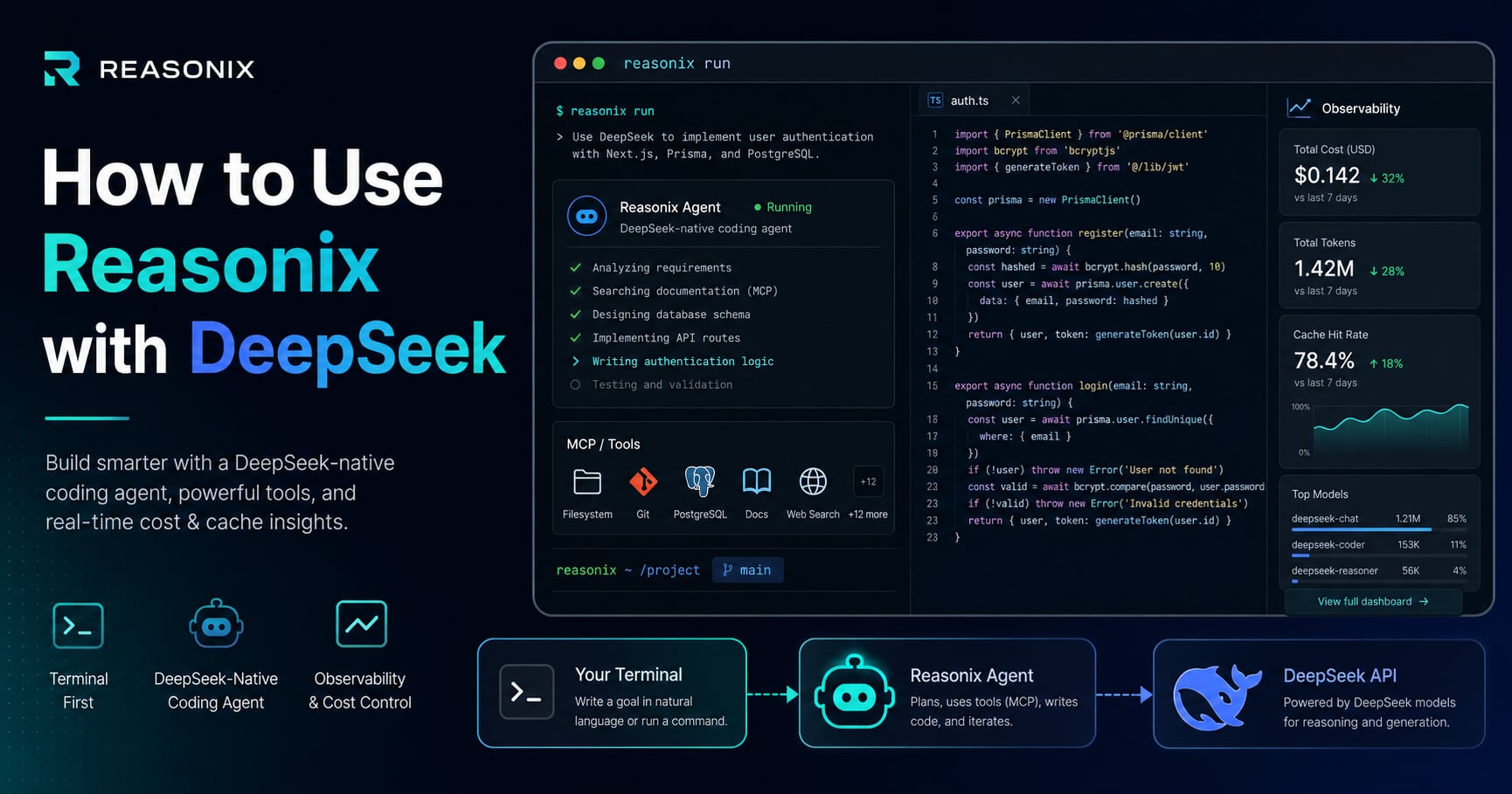
If you like DeepSeek’s model pricing but want a coding workflow that feels more deliberate than a raw API call, Reasonix is one of the most interesting new options. It is a terminal-native coding agent built specifically around DeepSeek’s API, with an agent loop designed to preserve cacheable context across long sessions.
If you already follow the AI Engineering hub, the LLM agents hub, or the broader AI Agents category, this post fits directly into that same progression. For supporting context, read What is MCP (Model Context Protocol)? Understanding the Differences, What Are AI Agent Skills? How Claude Skills Work, and Claude Code Subagents: What They Are and How They Work as well.
Table of Contents
Open Table of Contents
- What Is Reasonix with DeepSeek?
- Why Developers Care About This Setup
- How Reasonix Works with DeepSeek
- Cache Hit and Cost Optimization
- Prerequisites Before You Start
- How to Install and Run Reasonix with DeepSeek
- Useful Commands and Workflow Patterns
- Advantages of Using Reasonix with DeepSeek
- 1. It is built for DeepSeek instead of merely compatible with DeepSeek
- 2. It aligns the agent loop with DeepSeek caching behavior
- 3. It defaults to the right cheap model tier
- 4. It keeps the developer in the terminal
- 5. It supports serious agent building blocks
- 6. It exposes cost and behavior more transparently
- Why This Feels Like a Game Changer
- Trade-Offs and Limitations
- Best Use Cases
- Conclusion
- References
- YouTube Videos
What Is Reasonix with DeepSeek?
Reasonix is an open-source, terminal-first AI coding agent designed specifically for the DeepSeek API. It is not a general multi-model wrapper that happens to support DeepSeek as one backend. Its core pitch is the opposite: it is DeepSeek-native by design.
That distinction matters because DeepSeek’s API supports context caching, and Reasonix is built around keeping long-running sessions structurally stable enough to benefit from that. Instead of treating caching as a minor optimization, Reasonix treats it as a first-class design constraint.
In practical terms, this means:
- You work from the terminal, not from a browser tab.
- The agent can read files, edit code, and run commands in your project.
- The loop is designed to preserve prompt-prefix stability across turns.
- You can stay on DeepSeek-V4-Flash by default and selectively escalate harder turns to DeepSeek-V4-Pro.
Why Developers Care About This Setup
Most AI coding setups optimize for one of three things:
- Best possible model quality.
- Tight IDE integration.
- Lowest practical cost for long sessions.
Reasonix with DeepSeek is compelling because it leans hard into the third category without giving up the basics of agentic coding. You still get tool use, workflow persistence, MCP integration, skills, and session control, but the whole harness is tuned around cache retention and cost per long session rather than just raw model access.
That changes the mental model. Instead of asking, “Can I afford to leave the agent running while it explores the codebase?” developers can start asking:
- Can I keep one long session alive and let the cache do the work?
- Can I avoid resetting context and paying full input cost again?
- Can I reserve premium turns for the small number of tasks that actually need them?
How Reasonix Works with DeepSeek
flowchart TD
  A[Developer in terminal] --> B[Reasonix TUI]
  B --> C[Read project files]
  B --> D[Run shell tools]
  B --> E[Call MCP servers]
  C --> F[Build stable context prefix]
  D --> F
  E --> F
  F --> G[DeepSeek API]
  G --> H[DeepSeek-V4-Flash by default]
  H --> I[Tool calls and code suggestions]
  I --> B
  B --> J{Need more power?}
  J -->|Yes| K["/pro or /preset max"]
  K --> L[DeepSeek-V4-Pro]
  L --> B
  J -->|No| B
The official DeepSeek integration page describes three ideas behind the setup:
- A cache-first loop
- Flash-first cost control
- Automatic tool-call repair
The Reasonix site and repo expand this into a broader workflow:
- Persistent terminal session
- MCP server mounting
- Markdown-based skills
- Event replay and stats
- Slash-command controls for model tier changes
This is closely related to the broader agent patterns discussed in What is MCP (Model Context Protocol)? Understanding the Differences. Reasonix is not just “a model in a shell.” It is a full agent harness around DeepSeek.
Cache Hit and Cost Optimization
This is the core reason to care about Reasonix.
DeepSeek exposes cached-input pricing, and Reasonix is engineered around preserving a byte-stable prompt prefix across turns so more of your repeated context can bill at the cached rate instead of the full miss rate. That is a very different strategy from simply “write shorter prompts” or “use a cheaper model.”
The official Reasonix materials frame the product around this exact behavior:
- Keep the session alive.
- Keep the shared prefix stable.
- Avoid unnecessary prompt churn.
- Use Flash by default.
- Escalate only selected turns to Pro.
That combination matters because long coding sessions naturally accumulate repeated context:
- repo structure
- coding conventions
- earlier findings
- tool outputs
- running plan and constraints
In a generic harness, that repeated context can become expensive quickly if each turn rewrites or reorganizes the working prompt enough to reduce cache reuse. Reasonix’s value proposition is that the loop itself tries to avoid that waste.
The public project materials highlight real-world examples such as roughly 94% cache hit in long sessions on the website and a repo case study showing 99.82% cache hit for one high-volume day. Those numbers are project-reported examples, not guarantees, but they show what the architecture is trying to optimize for.
The practical takeaway is simple:
- High cache hit lowers repeated input cost.
- Flash-first routing lowers baseline spend.
- Selective Pro escalation prevents premium pricing from becoming your default.
- Stable long sessions are where the savings compound.
Prerequisites Before You Start
Before you use Reasonix with DeepSeek, make sure you have the following:
- A DeepSeek API key from the DeepSeek Platform.
- A local project directory you want the agent to inspect or edit.
- A modern Node.js installation.
- A terminal workflow you are comfortable operating inside.
There is one detail worth calling out clearly: the current DeepSeek integration page says Node.js 20.10+, while the Reasonix website says Node.js 22+. When project docs disagree like this, the safer rule is to follow the Reasonix project’s own newer requirement first, then fall back only if the release notes say otherwise.
If you are on Windows, the DeepSeek docs also note that you should install Git for Windows.
How to Install and Run Reasonix with DeepSeek
The setup flow is intentionally small.
1. Get a DeepSeek API key
Create a key in the DeepSeek Platform dashboard. On first launch, Reasonix can prompt you for the key through its built-in setup flow and store it in ~/.reasonix/config.json.
2. Move into your project
cd /path/to/your-project3. Launch Reasonix
npx reasonix codeThat is the simplest way to start. No global install is required for a first test.
4. Let the first-run wizard configure the session
Reasonix will ask for your DeepSeek API key and persist the local configuration for later runs.
5. Start with Flash, then escalate selectively
By default, Reasonix uses DeepSeek-V4-Flash, which is the right default for cheaper iteration. When you hit a tougher task, you can raise the quality ceiling inside the session:
- Use
/proto upgrade the next turn - Use
/preset maxto keep the whole session on Pro
This is a good default operating model because it avoids paying premium model rates on every exploratory step.
Example first-session flow
$ cd my-app
$ npx reasonix code

Ask the agent:
- "Scan this repo and explain the auth flow."
- "Find the bug in the login callback."
- "Propose a fix before writing files."
- "Run tests after patching."
That combination of repo awareness, terminal tool use, and selective model escalation is the real value of the setup.
Useful Commands and Workflow Patterns
Here are the patterns that make Reasonix with DeepSeek more practical than a plain API playground:
1. Stay in one long-running session
Reasonix is explicitly designed to be left running. That matters because cache economics improve when the session keeps reusing the same stable prefix instead of rebuilding context from scratch on every new run.
2. Mount MCP servers when you need external systems
According to the official Reasonix documentation, MCP is first-class. You can attach servers over stdio, SSE, or Streamable HTTP.
Example:
reasonix code \
  --mcp 'github=npx -y @modelcontextprotocol/server-github' \
  --mcp 'pg=https://mcp.internal/pg/sse'
If you are already thinking in terms of tool orchestration, this makes Reasonix feel much closer to a modern agent runtime than a normal coding assistant.
3. Use skills for reusable project workflows
Reasonix supports Markdown skills under .reasonix/skills/*.md. That gives teams a way to encode repeatable local playbooks such as:
- code review
- migration checklists
- test generation rules
- repo-specific guardrails
That pattern overlaps conceptually with the skills model described in What Are AI Agent Skills? How Claude Skills Work, but here it is tied directly into a DeepSeek-native terminal harness.
4. Inspect cost and replay behavior
Reasonix also exposes replay, events, and stats commands. That is useful because you can move beyond vague impressions and inspect what the agent actually did, how much it cost, and whether the session structure stayed efficient enough to preserve strong cache-hit behavior.
Advantages of Using Reasonix with DeepSeek
The strongest advantages are not just “it is cheaper.” They are architectural, and most of them point back to cache retention and cost discipline.
1. It is built for DeepSeek instead of merely compatible with DeepSeek
Many tools support multiple providers by abstracting them behind one interface. That is convenient, but abstractions often leave performance and cost on the table. Reasonix takes the opposite path: it couples itself to DeepSeek’s behavior and tries to exploit that coupling.
2. It aligns the agent loop with DeepSeek caching behavior
DeepSeek’s docs expose context caching as a real API capability. Reasonix turns that into a workflow decision by keeping the loop append-only and cache-aware. That is a more meaningful optimization than “just send shorter prompts,” because it attacks repeated input cost at the session-design level.
3. It defaults to the right cheap model tier
Starting on V4-Flash and escalating only when needed is a better operational pattern than forcing every turn through a premium model. In practice, this is one of the cleanest ways to control spend without making the workflow clumsy.
4. It keeps the developer in the terminal
For developers who already use git diff, shell commands, and local tooling, Reasonix fits the existing workspace instead of forcing an IDE-centric workflow.
5. It supports serious agent building blocks
This includes:
- MCP
- skills
- hooks
- sandboxed tools
- model switching
- session replay
That is enough to support real engineering workflows, not just toy prompt demos.
6. It exposes cost and behavior more transparently
Reasonix’s own materials talk openly about cache hit, token use, and session cost. That transparency matters when teams are deciding whether to operationalize an AI coding workflow instead of just experimenting with it, because you can reason about actual unit economics instead of guessing from monthly bills.
Why This Feels Like a Game Changer
Calling any tool a “game changer” is easy marketing language, so it is worth being precise.
Reasonix with DeepSeek feels different for three practical reasons, and all three are tied to how cost gets controlled in a persistent agent loop.
1. It turns DeepSeek’s pricing model into a workflow advantage
Normally, model pricing is just a spreadsheet concern for the person paying the bill. Here, pricing directly shapes how the agent loop is designed. That is unusual and strategically important because the harness is trying to preserve cacheable bytes, not just reduce token count in the abstract.
2. It makes long agent sessions more realistic
A lot of coding agents are pleasant for short bursts but expensive or messy across long iterative sessions. Reasonix tries to solve exactly that failure mode by making long-session cost behavior part of the product, not an afterthought.
3. It reduces the gap between “cheap model” and “usable coding agent”
Cheap APIs are not automatically productive tools. Reasonix matters because it wraps DeepSeek in the missing harness:
- terminal execution
- tool orchestration
- context management
- upgrade path from Flash to Pro
That is why this setup can feel like more than just another CLI. It gives DeepSeek a harness that is trying to preserve the cost advantage during real work, not just in benchmark screenshots.
A more careful version of the claim
The best way to say it is this:
Reasonix is a game changer for developers who already want to bet on DeepSeek, work in the terminal, and care about keeping long-running coding sessions economically sustainable.
That is narrower than “best coding agent overall,” but it is much more defensible.
Trade-Offs and Limitations
This setup is not universally better.
1. It is DeepSeek-only by design
If you want a single tool that freely swaps between OpenAI, Anthropic, Gemini, and others, Reasonix is not trying to be that.
2. Model quality still matters
A better harness does not magically make a weaker model stronger on every task. If your workflow depends on maximum reasoning quality every turn, a premium model stack may still be the better default.
3. Some public cost claims are project-reported, not guarantees
The Reasonix repo highlights a single-day example of very high cache hit and dramatically lower spend. That is useful directional evidence, but it should not be treated as a universal promise for every repo, every prompt style, or every team.
4. Terminal-first is a feature for some people and a barrier for others
If you live in the shell, this is natural. If you want a polished IDE-native editing experience, it may feel rougher than editor-first tools.
5. You still need normal engineering discipline
You must still review diffs, run tests, and verify behavior. An efficient agent loop does not remove the need for engineering judgment.
Best Use Cases
Reasonix with DeepSeek is especially strong in these scenarios:
-
Repo exploration in long sessions You want the agent to keep reading the same codebase over many turns without repeated context cost exploding.
-
Budget-sensitive coding assistance You want a practical coding agent workflow but do not want premium-model economics on every interaction.
-
Terminal-heavy developer teams Your workflow already lives in shell tools, Git, and local scripts.
-
MCP-enabled engineering tasks You want the agent to access GitHub, databases, or internal services through MCP servers in one unified loop.
-
Skill-driven project workflows You want repo-specific task playbooks instead of relying on ad hoc prompting every time.
Conclusion
Reasonix with DeepSeek is not interesting because it adds one more terminal AI tool to the market. It is interesting because it treats DeepSeek’s caching behavior, model tiers, and agent economics as the core product surface.
If your goal is the absolute best model output on every turn, you will still compare it against premium alternatives. But if your goal is to make DeepSeek genuinely usable as a long-running coding agent, Reasonix is one of the clearest examples of why a model-native harness can outperform a generic wrapper.
The next question is not just whether DeepSeek is cheap. It is whether your agent loop is designed well enough to turn that pricing advantage into a better developer workflow. Reasonix shows what that looks like in practice.
For adjacent reading, continue with What is MCP (Model Context Protocol)? Understanding the Differences, What Are AI Agent Skills? How Claude Skills Work, and Claude Code Subagents: What They Are and How They Work.
References
-
Integrate with Reasonix - DeepSeek API Docs
https://api-docs.deepseek.com/quick_start/agent_integrations/reasonix -
Reasonix Official Website
https://reasonix.homes/ -
DeepSeek-Reasonix GitHub Repository
https://github.com/esengine/deepseek-reasonix -
DeepSeek Models and Pricing - DeepSeek API Docs
https://api-docs.deepseek.com/quick_start/pricing
YouTube Videos
-
“CodeWhale VS Reasonix: Two Different Bets on DeepSeek Coding Agent”
https://www.youtube.com/watch?v=rDr1gZ-4CrQ -
“DeepSeek reasonix, DeepSeek native coding agent with high caching and low cost | EP #52”
https://www.youtube.com/watch?v=tQ4m2CrD34s -
“DeepSeek-Reasonix Review: The Native AI Coding Agent for DeepSeek—How Much Can It Really Save on …“
https://www.youtube.com/watch?v=tChx4aZz60M