 ADevGuide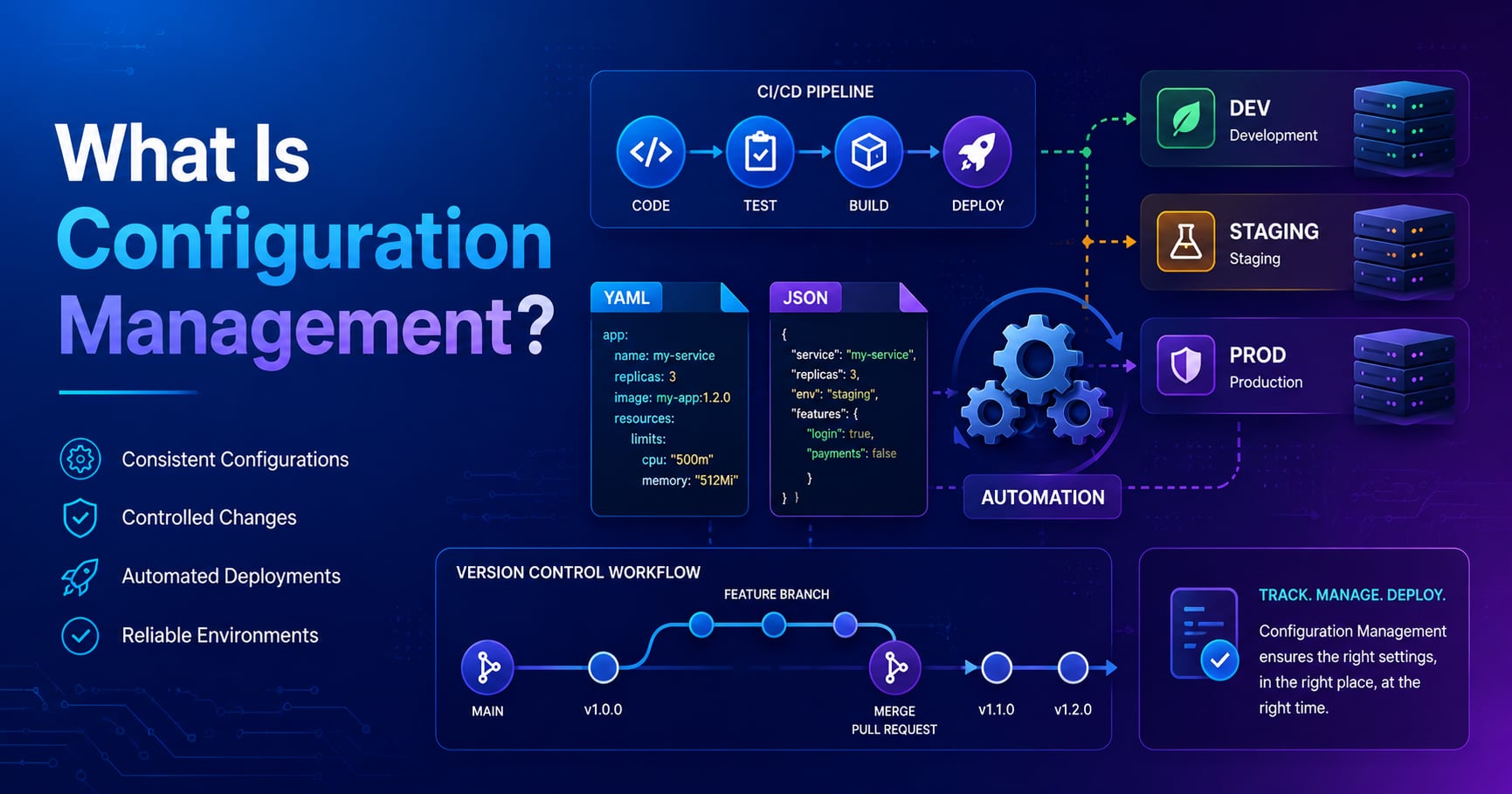
You deploy your application to production and everything breaks. The code is identical to what worked in staging, but suddenly database connections fail, feature flags are wrong, and logging floods your dashboard. The culprit? Configuration drift—when settings across environments become inconsistent because there’s no reliable way to track or enforce them.
Configuration management is the practice of tracking, versioning, and applying system and application settings in a structured, repeatable way. It ensures that every environment—development, staging, production—uses the correct configuration without manual copying, guessing, or hardcoding values into source code.
In this guide, you’ll learn what configuration management is, how it differs from simple environment variables, why production teams treat configuration as infrastructure, and the practical tools and patterns that keep complex systems from falling into chaos.
If you’re following the learning path, read What Are Environment Variables? Complete Guide for Developers first, which covers the foundation of external configuration. For broader context, see How Logging Works in Backend Systems and the Practical Backend Engineering series as your roadmap.
Table of Contents
Open Table of Contents
- What Is Configuration Management?
- Why Configuration Management Matters
- Configuration Management vs Environment Variables
- How Configuration Management Works
- The Desired State Model
- Configuration as Code
- Practical Tools for Configuration Management
- Real-World Example: Managing Multi-Environment Configuration
- Configuration Management in Different Contexts
- Best Practices
- 1. Treat Configuration as Code
- 2. Separate Configuration by Environment, Not by Secret Level
- 3. Make Configuration Changes Auditable
- 4. Validate Configuration Before Deployment
- 5. Use Immutable Infrastructure When Possible
- 6. Document Configuration Decisions
- 7. Test Configuration Changes in Non-Production First
- Common Pitfalls to Avoid
- 1. Storing Secrets in Version Control
- 2. Inconsistent Configuration Formats
- 3. Manual Configuration Changes Without Documentation
- 4. Not Testing Configuration Rollback
- 5. Tight Coupling Between Configuration and Application Code
- 6. Over-Complicating Configuration Structure
- 7. Ignoring Configuration Drift Detection
- Interview Questions
- 1. What is configuration management and why is it important?
- 2. How does configuration management differ from using environment variables?
- 3. What is the desired state model in configuration management?
- 4. What does idempotency mean in configuration management and why is it important?
- 5. How do you handle secrets in configuration management?
- 6. What is configuration drift and how do you prevent it?
- 7. When would you use Ansible vs Terraform vs Kubernetes ConfigMaps for configuration management?
- 8. How do you test configuration changes before deploying to production?
- Conclusion
- References
- YouTube Videos
What Is Configuration Management?
Configuration management is a systems engineering and operations practice that maintains computer systems, servers, networks, and applications in a known, consistent, and desired state. It answers three fundamental questions:
- What is the current configuration? (inventory and state tracking)
- What should the configuration be? (desired state definition)
- How do we get from current to desired? (automation and enforcement)
In the simplest terms: configuration management ensures that if you define “production database should use connection pool size 50, SSL enabled, timeout 30 seconds,” that exact configuration is applied every time, everywhere, with an audit trail showing when and why it changed.
Configuration Management Scope
Configuration management applies at multiple levels:
Infrastructure Level:
- Server configurations (CPU limits, memory, disk mounts)
- Network settings (firewalls, load balancers, DNS)
- Operating system configuration (users, permissions, services)
Application Level:
- Database connection strings
- API endpoints and service URLs
- Feature flags and business rules
- Log levels and monitoring thresholds
Deployment Level:
- Which version of code runs where
- Rolling update strategies
- Rollback procedures
The term “configuration management” originated in systems engineering and IT operations (think Ansible, Puppet, Chef managing server fleets), but the principles apply equally to application-level settings that developers handle daily.
Why Configuration Management Matters
Configuration management solves problems that only become visible at scale or when things go wrong:
1. Configuration Drift Prevention
Imagine three engineers manually SSH into production servers over six months, each tweaking settings to fix urgent issues. Now those servers have different nginx timeouts, different log rotation policies, different security patches. This is configuration drift—when systems that should be identical gradually diverge.
Drift causes:
- Unpredictable behavior (“it works on server A but not server B”)
- Security vulnerabilities (one server missed a patch)
- Troubleshooting nightmares (which setting actually caused the bug?)
Configuration management tools enforce consistency by treating configuration as a versioned, reproducible artifact. If a server drifts from the desired state, automation detects and corrects it.
2. Disaster Recovery and Reproducibility
Your production database server crashes permanently. How quickly can you recreate it with the exact same configuration?
Without configuration management:
- Hunt through documentation (if it exists)
- Find someone who remembers the settings
- Manually reconfigure, hoping you got it right
- Discover missing settings only when the application breaks
With configuration management:
- Your infrastructure-as-code definition describes every setting
- Run the automation tool to provision a new server
- Within minutes, you have an identical replacement
- The entire process is tested regularly in staging
Netflix famously uses “Chaos Monkey” to randomly kill production servers, trusting their configuration management to auto-rebuild them correctly. This would be impossible without strong configuration discipline.
3. Multi-Environment Consistency
Your application needs to run in at least three environments: development (your laptop), staging (pre-production testing), and production. Each environment shares 90% of the configuration but differs in critical ways:
| Setting | Development | Staging | Production |
|---|---|---|---|
| Database URL | localhost:5432 | staging-db.internal | prod-db.region1.aws |
| Log Level | DEBUG | INFO | ERROR |
| Cache TTL | 10 seconds | 5 minutes | 1 hour |
| Feature: Beta UI | Enabled | Enabled | Disabled |
Without configuration management, developers maintain separate config files, hoping they remember to update all three when adding a new setting. Mistakes are common: a debug flag left on in production, a staging URL leaked to production, a new feature flag forgotten until deployment fails.
Configuration management systems use templating and inheritance to share common config while explicitly overriding environment-specific values. This reduces duplication and makes differences explicit and trackable.
4. Auditability and Compliance
Regulated industries (finance, healthcare, government) must prove who changed what configuration when, and that changes went through proper approval. Storing configuration in version control with standard code review workflows automatically provides this audit trail.
If a security incident occurs, you can answer:
- What changed in the week before the breach?
- Who approved the firewall rule change?
- Can we instantly revert to the previous secure state?
Configuration Management vs Environment Variables
If you’ve read What Are Environment Variables?, you might wonder: aren’t configuration management and environment variables the same thing?
They’re related but serve different purposes:
Environment Variables:
- Scope: Process-level runtime configuration
- Management: Set manually per-environment (shell, .env files, platform dashboards)
- Best for: Secrets, runtime overrides, 12-factor app config
- Example:
DATABASE_URL=postgres://...
Configuration Management:
- Scope: System and infrastructure-wide settings, versioned and automated
- Management: Defined in code, applied via automation tools
- Best for: Repeatable infrastructure, multi-server consistency, complex dependencies
- Example: Ansible playbook that installs nginx, configures SSL, sets file limits, and deploys application config files
How They Work Together
In practice, configuration management tools often set environment variables as part of their job:
# Ansible playbook (configuration management)
- name: Deploy application configuration
  template:
    src: app-config.env.j2
    dest: /etc/myapp/.env
  vars:
    database_url: "{{ prod_db_url }}"
    log_level: "error"
This Ansible task generates a .env file from a template, ensuring every production server gets identical environment variables. The environment variables are the runtime mechanism; configuration management is the orchestration layer that keeps them consistent.
Rule of thumb: Use environment variables for application runtime config. Use configuration management tools when you need to coordinate settings across multiple servers, version configuration changes, or automate infrastructure setup.
How Configuration Management Works
Modern configuration management follows a declarative, automated workflow:
The Configuration Management Flow
flowchart TD
    A[Define Desired State] --> B[Store in Version Control]
    B --> C[Configuration Management Tool]
    C --> D[Compare Current vs Desired]
    D --> E{State Matches?}
    E -->|Yes| F[No Action Needed]
    E -->|No| G[Apply Changes]
    G --> H[Verify State]
    H --> I[Log Changes]
    I --> J[Alert on Failure]
Step-by-step breakdown:
- Define desired state: You write configuration as code (YAML, JSON, HCL) describing how systems should look
- Version control: Configuration files live in Git alongside application code
- Tool execution: Ansible/Terraform/Chef reads the configuration
- State comparison: Tool inspects current system state and compares to desired state
- Change application: If differences exist, tool makes only necessary changes (idempotent operations)
- Verification: Tool confirms changes succeeded
- Auditing: All changes logged with timestamps and actor information
Idempotency: The Key Property
A configuration management operation is idempotent if running it multiple times produces the same result as running it once. This is critical for reliability:
Non-idempotent (BAD):
echo "max_connections=200" >> postgresql.confRun this twice, you get the setting twice. Run it 10 times, file is corrupted.
Idempotent (GOOD):
# Ansible ensuring a setting exists
lineinfile:
  path: /etc/postgresql/postgresql.conf
  regexp: '^max_connections\s*='
  line: 'max_connections = 200'
Run this 100 times, result is always identical: file has exactly one max_connections=200 line.
Idempotency means you can safely re-run configuration management without fear of breaking things. If a deployment fails halfway through, just re-run it—the tool figures out what’s already done and completes the rest.
The Desired State Model
The desired state model is the philosophical foundation of modern configuration management. Instead of writing scripts that say “do these steps in order,” you declare “here’s what the end result should look like.”
Imperative vs Declarative Approaches
Imperative (scripting approach):
#!/bin/bash
# Install nginx
apt-get update
apt-get install -y nginx

# Configure nginx
cp nginx.conf /etc/nginx/nginx.conf

# Start nginx
systemctl start nginx
systemctl enable nginx
This script tells the system how to achieve the goal. Problems:
- Run it twice, might fail (nginx already installed)
- Doesn’t handle intermediate states (what if nginx.conf copy fails?)
- No rollback built-in
- Brittle to order changes
Declarative (desired state approach):
# Ansible playbook
- name: Ensure nginx is installed and running
  hosts: webservers
  tasks:
    - name: Install nginx package
      apt:
        name: nginx
        state: present

    - name: Deploy nginx configuration
      template:
        src: nginx.conf.j2
        dest: /etc/nginx/nginx.conf
      notify: restart nginx

    - name: Ensure nginx is running
      service:
        name: nginx
        state: started
        enabled: yes

  handlers:
    - name: restart nginx
      service:
        name: nginx
        state: restarted
This playbook declares what should exist. The tool figures out how:
- If nginx is already installed, skip installation
- If config file matches template, skip deployment
- If nginx is running, skip start command
- Run this 10 times safely—only changes if state differs from desired
The declarative model makes configuration management robust, predictable, and self-documenting.
Configuration as Code
Configuration as Code (CaC) extends the “Infrastructure as Code” philosophy to all configuration, not just infrastructure provisioning. The principles:
1. Configuration Lives in Version Control
Every configuration change goes through the same workflow as code:
developer writes config change → pull request → code review → merge → automated deploymentBenefits:
- Full history of who changed what when
- Peer review catches mistakes before production
- Rollback is
git revert+ redeploy - Configuration is testable in CI/CD pipelines
2. Configuration is Human-Readable and Diffable
Compare these two approaches to storing database configuration:
Binary/UI-managed (BAD):
- Click through admin UI to set pool size to 50
- No record of previous value
- Can’t review change before applying
- Can’t easily propagate to other environments
Configuration as Code (GOOD):
# database.yml
production:
  pool_size: 50  # Changed from 20 due to load spike - ticket ABC-123
  timeout_seconds: 30
  ssl_enabled: true
The YAML file shows exactly what changed (20 → 50), includes a comment explaining why, and can be reviewed in a pull request before deploying.
3. Separation of Code and Data
Application code defines how to connect to a database. Configuration defines which database and how to configure the connection. This separation means:
- Same code works in all environments
- Configuration changes don’t require code deployment
- Developers without production access can’t accidentally change prod settings
- Operations teams can tune infrastructure without touching application code
4. Automated Testing and Validation
Configuration as code enables testing before deployment:
# Validate Kubernetes configuration syntax
kubectl apply --dry-run=client -f production-config.yaml

# Test Terraform infrastructure changes
terraform plan

# Lint YAML configuration
yamllint config/production.yml

# Custom validation
python validate_config.py --env production
This catches errors like:
- Syntax mistakes (invalid YAML)
- Missing required fields
- Invalid value ranges (negative timeout)
- Broken references (service name doesn’t exist)
You find these issues in CI, not during a production incident.
Practical Tools for Configuration Management
The configuration management ecosystem spans multiple categories. Here are the major tools and when to use them:
Infrastructure Configuration Management
These tools manage servers, networks, and operating system configuration:
Ansible
- Approach: Agentless, push-based, SSH
- Language: YAML playbooks
- Best for: General-purpose server configuration, application deployment
- Example: Configure 100 web servers with identical nginx settings
Puppet
- Approach: Agent-based, pull model
- Language: Puppet DSL
- Best for: Large-scale enterprise environments, continuous enforcement
- Example: Ensure all corporate laptops have mandatory security software
Chef
- Approach: Agent-based, pull model
- Language: Ruby-based recipes
- Best for: Complex infrastructure, heavy customization
- Example: Dynamically configure servers based on role and environment
SaltStack
- Approach: Agent-based, fast event-driven
- Language: YAML + Jinja2
- Best for: Real-time orchestration, high-speed parallel execution
- Example: Apply emergency security patch to 10,000 servers in minutes
Infrastructure Provisioning and State Management
Terraform
- Approach: Declarative infrastructure provisioning
- Language: HCL (HashiCorp Configuration Language)
- Best for: Cloud infrastructure (AWS, Azure, GCP), immutable infrastructure
- Example: Define entire AWS VPC, databases, load balancers as code
# Terraform configuration example
resource "aws_db_instance" "production" {
  identifier           = "prod-db"
  engine              = "postgres"
  instance_class      = "db.r5.large"
  allocated_storage   = 100
  storage_encrypted   = true
  backup_retention_period = 7

  parameter_group_name = aws_db_parameter_group.prod.name
}

resource "aws_db_parameter_group" "prod" {
  family = "postgres14"

  parameter {
    name  = "max_connections"
    value = "200"
  }

  parameter {
    name  = "shared_buffers"
    value = "8GB"
  }
}
Application Configuration Management
Kubernetes ConfigMaps and Secrets
- Approach: Native Kubernetes configuration objects
- Best for: Container orchestration environments
- Example: Inject environment-specific config into pods
apiVersion: v1
kind: ConfigMap
metadata:
  name: app-config
data:
  database.url: "postgres://prod-db.internal:5432/app"
  log.level: "error"
  cache.ttl: "3600"
Spring Cloud Config / Consul / etcd
- Approach: Centralized configuration server, dynamic updates
- Best for: Microservices, runtime configuration changes without restart
- Example: Update feature flag across 50 microservices instantly
Which Tool to Choose?
Use Ansible when:
- You manage a moderate number of servers (10-1000)
- You want simplicity and no agent installation
- You need both configuration management and orchestration
- Your team prefers YAML over code
Use Terraform when:
- You’re provisioning cloud infrastructure
- You need multi-cloud support
- You want immutable infrastructure (destroy and recreate rather than modify)
- You need to track infrastructure state across teams
Use Kubernetes ConfigMaps when:
- You’re already running containerized applications in Kubernetes
- You need environment-specific config injected at pod creation
- You want configuration updates to trigger rolling deployments
Use a configuration server (Consul, Spring Cloud Config) when:
- You have many microservices
- You need to change configuration without redeploying
- You want A/B testing or gradual feature rollouts
- You need dynamic service discovery alongside configuration
Many teams use multiple tools: Terraform to provision cloud resources, Ansible to configure servers, and Kubernetes ConfigMaps for application config. The key is treating all configuration as code and managing it consistently.
Real-World Example: Managing Multi-Environment Configuration
Let’s walk through a practical scenario: deploying a Node.js API to three environments (development, staging, production) with consistent configuration management.
Setup: Configuration Structure
Your project structure:
my-api/
├── src/                      # Application code
├── config/
│   ├── base.yml             # Shared across all environments
│   ├── development.yml      # Dev-specific overrides
│   ├── staging.yml          # Staging-specific overrides
│   └── production.yml       # Prod-specific overrides
├── ansible/
│   ├── playbooks/
│   │   └── deploy.yml
│   └── inventory/
│       ├── development.ini
│       ├── staging.ini
│       └── production.ini
└── package.json
config/base.yml (shared settings):
# Base configuration inherited by all environments
app:
  name: "MyAPI"
  port: 3000

database:
  pool_size: 10
  timeout_seconds: 30
  ssl_enabled: false

logging:
  format: "json"
  include_trace: false

features:
  beta_ui: false
  rate_limiting: true
config/production.yml (production overrides):
# Production-specific configuration
database:
  pool_size: 50           # Higher pool for production traffic
  ssl_enabled: true       # Security requirement

logging:
  level: "error"          # Reduce log noise
  include_trace: false

features:
  beta_ui: false          # Stable features only
  rate_limiting: true
  rate_limit_requests: 1000
Deployment with Ansible
ansible/playbooks/deploy.yml:
---
- name: Deploy MyAPI with environment-specific configuration
  hosts: api_servers
  become: yes
  vars:
    app_dir: /opt/myapi
    config_env: "{{ lookup('env', 'DEPLOY_ENV') }}"

  tasks:
    - name: Create application directory
      file:
        path: "{{ app_dir }}"
        state: directory
        owner: appuser
        group: appuser

    - name: Deploy application code
      synchronize:
        src: ../../src/
        dest: "{{ app_dir }}/src/"
        delete: yes

    - name: Merge base and environment-specific configuration
      template:
        src: ../../config/{{ item }}.yml
        dest: "{{ app_dir }}/config/{{ item }}.yml
      loop:
        - base
        - "{{ config_env }}"

    - name: Set environment variables from secure vault
      copy:
        content: |
          NODE_ENV={{ config_env }}
          DATABASE_URL={{ vault_database_url }}
          API_KEY={{ vault_api_key }}
        dest: "{{ app_dir }}/.env"
        owner: appuser
        group: appuser
        mode: '0600'
      no_log: true  # Don't log sensitive values

    - name: Install Node.js dependencies
      npm:
        path: "{{ app_dir }}"
        production: yes
      become_user: appuser

    - name: Restart API service
      systemd:
        name: myapi
        state: restarted
        enabled: yes

    - name: Wait for API health check
      uri:
        url: "http://localhost:3000/health"
        status_code: 200
      retries: 5
      delay: 3
Deployment Workflow
Deploy to staging:
export DEPLOY_ENV=staging
ansible-playbook -i ansible/inventory/staging.ini ansible/playbooks/deploy.yml
Deploy to production:
export DEPLOY_ENV=production
ansible-playbook -i ansible/inventory/production.ini ansible/playbooks/deploy.yml
What This Achieves
Consistency: Every server in production gets identical configuration from production.yml. No manual SSH tweaks.
Auditability: All configuration changes are Git commits with author, timestamp, and reason.
Testability: You can deploy to staging first, verify behavior, then promote the same configuration to production.
Rollback: If production breaks, revert the Git commit and redeploy. You’re back to the last known-good configuration in minutes.
Secrets Management: Sensitive values (database passwords, API keys) never go in version control. They’re stored in Ansible Vault or external secret managers (AWS Secrets Manager, HashiCorp Vault) and injected at deployment time.
Configuration Loading in Application Code
Your Node.js application reads the merged configuration:
// src/config/loader.js
const fs = require('fs');
const yaml = require('js-yaml');
const path = require('path');

function loadConfig() {
  const env = process.env.NODE_ENV || 'development';
  const configDir = path.join(__dirname, '../../config');

  // Load base configuration
  const baseConfig = yaml.load(
    fs.readFileSync(path.join(configDir, 'base.yml'), 'utf8')
  );

  // Load environment-specific overrides
  const envConfig = yaml.load(
    fs.readFileSync(path.join(configDir, `${env}.yml`), 'utf8')
  );

  // Deep merge: environment config overrides base
  const config = deepMerge(baseConfig, envConfig);

  // Override with environment variables (highest precedence)
  if (process.env.DATABASE_URL) {
    config.database.url = process.env.DATABASE_URL;
  }

  return config;
}

module.exports = loadConfig();
Precedence hierarchy (lowest to highest):
base.yml- defaults${env}.yml- environment overrides- Environment variables - runtime secrets
This three-tier model balances maintainability (shared base), flexibility (environment overrides), and security (secrets in env vars).
Configuration Management in Different Contexts
Configuration management principles apply beyond traditional servers. Here’s how different domains use these practices:
Frontend Applications
Modern frontend frameworks use environment-specific configuration:
Next.js configuration:
// next.config.js
module.exports = {
  env: {
    API_ENDPOINT: process.env.NEXT_PUBLIC_API_ENDPOINT,
  },

  // Environment-specific build optimization
  ...(process.env.NODE_ENV === 'production' && {
    compress: true,
    productionBrowserSourceMaps: false,
  }),
};
Build-time configuration baked into static assets, runtime configuration injected via environment variables.
Mobile Applications
Mobile apps use configuration management for:
- Feature flags: Toggle features without app store redeployment
- API endpoints: Point to staging/production backends
- A/B testing: Serve different experiences to user cohorts
- Configuration updates: Download config JSON on app launch
Example (iOS with remote config):
// Fetch remote configuration from backend
let config = try await ConfigManager.shared.fetchConfig()

if config.features.enableBetaUI {
    // Show new UI
} else {
    // Show stable UI
}
Database Configuration Management
Database schema and configuration evolve over time. Migration tools provide version-controlled database configuration:
Flyway migration (versioned SQL):
-- V1__initial_schema.sql
CREATE TABLE users (
  id SERIAL PRIMARY KEY,
  email VARCHAR(255) UNIQUE NOT NULL
);

-- V2__add_user_preferences.sql
ALTER TABLE users ADD COLUMN preferences JSONB DEFAULT '{}';
Flyway tracks which migrations ran on each database, ensuring all environments converge to the same schema version.
Secrets and Sensitive Configuration
Secrets management is a specialized subdomain of configuration management. Never store secrets in Git. Use dedicated secret management systems:
AWS Secrets Manager:
# Store secret
aws secretsmanager create-secret \
  --name prod/database/password \
  --secret-string "super_secret_password"

# Retrieve in application
SECRET=$(aws secretsmanager get-secret-value \
  --secret-id prod/database/password \
  --query SecretString \
  --output text)
HashiCorp Vault:
# Write secret
vault kv put secret/prod/db password=super_secret

# Read in application
DATABASE_PASSWORD=$(vault kv get -field=password secret/prod/db)
Kubernetes Secrets (encrypted at rest):
apiVersion: v1
kind: Secret
metadata:
  name: db-credentials
type: Opaque
data:
  password: c3VwZXJfc2VjcmV0  # Base64 encoded
Modern practice: secrets live in secret managers, configuration management pulls them at deploy time and injects them as environment variables. The application code is identical across environments; only the secret values differ.
Best Practices
Follow these proven practices to avoid common configuration management pitfalls:
1. Treat Configuration as Code
Do:
- Store all configuration in version control
- Require pull requests and code review for config changes
- Tag configuration versions that correspond to deployments
- Write tests that validate configuration schema
Don’t:
- Make “quick fixes” by manually editing production config files
- Store configuration in wikis or shared documents
- Trust memory (“I think the timeout was 30 seconds”)
2. Separate Configuration by Environment, Not by Secret Level
Good structure:
config/
├── base.yml          # Shared defaults
├── dev.yml           # Development overrides
├── staging.yml       # Staging overrides
└── production.yml    # Production overrides
Bad structure:
config/
├── public.yml        # Non-sensitive settings
└── secrets.yml       # Sensitive settings (DON'T PUT THIS IN GIT!)
Why? Every environment needs both public and sensitive config. Organize by environment, use secret managers for sensitive values.
3. Make Configuration Changes Auditable
Every configuration change should answer:
- Who made the change?
- When was it made?
- Why was it necessary? (link to ticket/incident)
- What exactly changed?
Git commit messages provide this automatically:
git log config/production.yml

commit a1b2c3d
Author: Alice <[email protected]>
Date: 2026-06-10

Increase database pool size from 20 to 50

Production experienced connection pool exhaustion during peak traffic.
Database CPU utilization remained below 40%, indicating we can handle
more concurrent connections.

Ticket: OPS-1234
4. Validate Configuration Before Deployment
Never deploy untested configuration. Add validation to CI/CD:
# .github/workflows/validate-config.yml
name: Validate Configuration
on: [pull_request]

jobs:
  validate:
    runs-on: ubuntu-latest
    steps:
      - uses: actions/checkout@v2

      - name: Validate YAML syntax
        run: yamllint config/*.yml

      - name: Validate required fields
        run: python scripts/validate_config_schema.py

      - name: Check for hardcoded secrets
        run: |
          if grep -r "password.*=.*[^{]" config/; then
            echo "ERROR: Found hardcoded password in config files"
            exit 1
          fi
5. Use Immutable Infrastructure When Possible
Instead of changing configuration on running servers (mutable), provision new servers with updated configuration and replace the old ones (immutable). This is the Terraform/Kubernetes model.
Benefits:
- No configuration drift (server is destroyed before drift happens)
- Easy rollback (keep old servers running, switch traffic back)
- Testable (new configuration tested on new servers before traffic hits them)
Trade-off: Requires automation and quick provisioning. Not practical for stateful resources like databases.
6. Document Configuration Decisions
For complex or non-obvious settings, add comments directly in configuration files:
database:
  # Changed to 50 from 20 on 2026-05-15
  # Production traffic analysis showed connection pool exhaustion at 20
  # CPU utilization at 40% indicates capacity for higher pool size
  # Monitor: If CPU > 80%, consider scaling database instance before pool size
  pool_size: 50
These comments survive in version control and help future engineers understand intent.
7. Test Configuration Changes in Non-Production First
Always follow this promotion path:
development → staging → productionNever change production configuration without first verifying the change works in staging with production-like load and data.
Common Pitfalls to Avoid
1. Storing Secrets in Version Control
Symptom: Database passwords, API keys, private keys committed to Git.
Impact: Security breach risk, leaked credentials require rotation across all systems.
Solution: Use secret managers (AWS Secrets Manager, Vault), never commit secrets. Use pre-commit hooks to scan for secrets:
# Install and enable git-secrets
git secrets --install
git secrets --register-aws
2. Inconsistent Configuration Formats
Symptom: Database config in YAML, API config in JSON, feature flags in .env file, some hardcoded in code.
Impact: Hard to understand full configuration, easy to miss settings during migration, difficult to automate.
Solution: Standardize on one format (YAML or JSON recommended), consolidate all configuration in one location.
3. Manual Configuration Changes Without Documentation
Symptom: Engineers SSH into production servers and tweak settings to fix urgent issues. No record of what changed.
Impact: Configuration drift, impossible to reproduce in other environments, “works on server A but not server B” mysteries.
Solution: Enforce policy—all configuration changes must be code reviewed and applied via automation. If an emergency requires manual change, immediately follow up with a proper configuration management commit documenting the change.
4. Not Testing Configuration Rollback
Symptom: Teams test deployments but never test reverting to previous configuration.
Impact: When a bad config change causes an incident, rollback fails or is too slow, extending downtime.
Solution: Regularly practice rollbacks in staging. Include rollback procedure in runbooks. Use infrastructure-as-code tools that make rollback a single command (e.g., terraform apply with previous state).
5. Tight Coupling Between Configuration and Application Code
Symptom: Application code hardcodes default values, making it impossible to override via configuration without code changes.
Example:
// BAD: Timeout hardcoded
const timeout = 30000;

// GOOD: Timeout configurable with sensible default
const timeout = config.database.timeout || 30000;Solution: Design application code to read all operational parameters from configuration, with reasonable defaults only as fallback.
6. Over-Complicating Configuration Structure
Symptom: Configuration split across dozens of files with complex inheritance rules and unclear precedence.
Impact: Engineers can’t determine which value actually applies, debugging becomes archaeology.
Solution: Keep configuration structure simple and explicit. Document precedence clearly. Prefer duplication over clever inheritance if it improves clarity.
7. Ignoring Configuration Drift Detection
Symptom: Configuration management tool runs once at deployment, never checks if servers diverged from desired state.
Impact: Manual changes or application bugs modify configuration files, causing inconsistency.
Solution: Run configuration management tools on a schedule (e.g., Puppet/Chef agent model) or implement monitoring that alerts on configuration drift. Tools like Ansible can run in “check mode” to detect drift without fixing it:
# Check if servers match desired state
ansible-playbook deploy.yml --check --diff
Interview Questions
1. What is configuration management and why is it important?
Configuration management is the practice of maintaining systems and applications in a known, consistent state by tracking, versioning, and automating configuration settings. It’s important because modern systems run across multiple environments (development, staging, production) and multiple servers. Without configuration management, manual processes lead to configuration drift, where systems that should be identical gradually diverge. This causes unpredictable behavior, security vulnerabilities, and makes disaster recovery difficult. Configuration management ensures every environment uses correct settings, all changes are auditable, and systems can be reproduced reliably after failures.
2. How does configuration management differ from using environment variables?
Environment variables are a runtime mechanism for passing configuration to processes, typically used for secrets and environment-specific settings like database URLs. Configuration management is a broader practice that orchestrates settings across infrastructure and applications, often setting those environment variables as part of its job. Environment variables handle the “what” (the actual values), while configuration management handles the “how” (ensuring the right values are set consistently across all servers). You might use Ansible (configuration management) to deploy a .env file (environment variables) to 100 servers, ensuring all servers have identical configuration.
3. What is the desired state model in configuration management?
The desired state model is a declarative approach where you define what the end result should look like rather than writing scripts that specify how to achieve it. For example, instead of writing “install nginx, copy config file, start service” (imperative), you declare “nginx should be installed, this config file should exist, nginx service should be running” (declarative). The configuration management tool compares the current state to the desired state and takes only the necessary actions to converge them. This makes the process idempotent—you can run it repeatedly safely—and more resilient to failures, since the tool handles edge cases like “package already installed” automatically.
4. What does idempotency mean in configuration management and why is it important?
Idempotency means that applying a configuration operation multiple times produces the same result as applying it once. For example, setting a configuration value to 50 is idempotent: whether you set it once or ten times, the value is 50. Appending a line to a file is not idempotent: do it ten times and you get ten duplicate lines. Idempotency is critical because it allows you to safely re-run configuration management without fear of breaking things. If a deployment fails halfway through, you just re-run it—the tool skips what’s already done and completes the rest. This makes configuration management robust and predictable, especially in distributed systems where partial failures are common.
5. How do you handle secrets in configuration management?
Secrets should never be stored in version control alongside configuration code. Best practice is to use dedicated secret management systems like AWS Secrets Manager, HashiCorp Vault, or cloud-provider secret stores. Configuration management tools retrieve secrets at deployment time and inject them as environment variables or files with restricted permissions. For example, an Ansible playbook might fetch database passwords from AWS Secrets Manager, write them to a .env file with 0600 permissions (read/write owner only), and ensure the file is owned by the application user. This keeps secrets out of Git while still allowing configuration-as-code practices for non-sensitive settings. Some teams also use encrypted vaults (like Ansible Vault) that can be committed to Git but require a decryption key at deployment time.
6. What is configuration drift and how do you prevent it?
Configuration drift occurs when servers or systems that should have identical configuration gradually diverge over time, usually due to manual changes or inconsistent deployment practices. For example, one engineer SSHs into a server to fix an urgent issue by tweaking a timeout value. If that change isn’t captured in configuration management, only that server has the change—other servers drift. Prevention strategies include enforcing policy that all config changes must go through configuration management (no manual SSH changes), using tools that continuously enforce desired state (like Puppet agents that check and correct drift every 30 minutes), and monitoring that detects when actual state differs from version-controlled configuration. Some teams use immutable infrastructure where servers are never modified—instead, new servers with updated config replace old ones, eliminating drift entirely.
7. When would you use Ansible vs Terraform vs Kubernetes ConfigMaps for configuration management?
Each tool serves different purposes. Use Terraform when provisioning cloud infrastructure (VPCs, databases, load balancers)—it’s designed for creating and managing infrastructure resources and tracking their state. Use Ansible for configuring existing servers (installing packages, deploying application config files, managing services)—it’s great for general-purpose automation across heterogeneous systems. Use Kubernetes ConfigMaps when running containerized applications in Kubernetes—they inject configuration into pods at runtime and integrate tightly with Kubernetes deployment workflows. In practice, teams often use multiple tools: Terraform provisions the infrastructure, Kubernetes ConfigMaps handle application config within the cluster, and Ansible might configure monitoring agents or security tools that run outside Kubernetes. The choice depends on your infrastructure model and where in the stack you’re managing configuration.
8. How do you test configuration changes before deploying to production?
Configuration changes should follow the same testing workflow as code. First, validate syntax and schema in CI/CD pipelines (e.g., use yamllint for YAML, custom scripts to check required fields exist). Second, deploy configuration to a staging environment that mirrors production, then run automated integration tests and manual verification. Third, use tools that support “dry run” or “plan” modes (like Terraform plan or Ansible —check) to preview exactly what changes will be applied without actually applying them. Fourth, implement gradual rollout strategies like blue-green deployment or canary releases where configuration changes apply to a small subset of servers first, monitored for issues before full deployment. Finally, practice rollback procedures regularly—you should be able to revert to previous configuration with a single command.
Conclusion
Configuration management transforms application settings from scattered, manually maintained values into version-controlled, automated, and auditable infrastructure. The discipline ensures that systems behave consistently across environments, configuration changes are reviewable and reversible, and disaster recovery is a matter of running automation rather than reconstructing from memory.
Key takeaways:
-
Configuration management maintains systems in a desired state, tracking what configuration exists and enforcing consistency through automation.
-
Environment variables handle runtime config; configuration management orchestrates the infrastructure that sets those variables consistently.
-
The desired state model lets you declare what should exist, and tools figure out how to achieve it idempotently.
-
Configuration as code stores all settings in version control, enabling code review, testing, and audit trails.
-
Use the right tool for the job: Terraform for infrastructure provisioning, Ansible for server configuration, Kubernetes ConfigMaps for container config, secret managers for sensitive values.
-
Prevent configuration drift by automating all changes, never making manual tweaks, and using tools that continuously enforce desired state.
The next topic in this series covers How Background Jobs Work in Web Applications—exploring how applications handle long-running tasks, scheduled work, and asynchronous processing without blocking user requests.
For related operational concerns, review How Logging Works in Backend Systems—another essential practice that requires careful configuration management. See the Practical Backend Engineering series for the complete learning path.
References
-
What is Configuration Management? - Red Hat
https://www.redhat.com/en/topics/automation/what-is-configuration-management -
The Twelve-Factor App: Config - Heroku
https://12factor.net/config -
Configuration Management Best Practices - Puppet
https://puppet.com/docs/puppet/latest/configuration_management_best_practices.html
YouTube Videos
-
“What is Configuration Management?“
https://www.youtube.com/watch?v=6aJ8qn8yV9U -
“What is Configuration Management (CM)?“
https://www.youtube.com/watch?v=66gpOMI2m4Y