 ADevGuide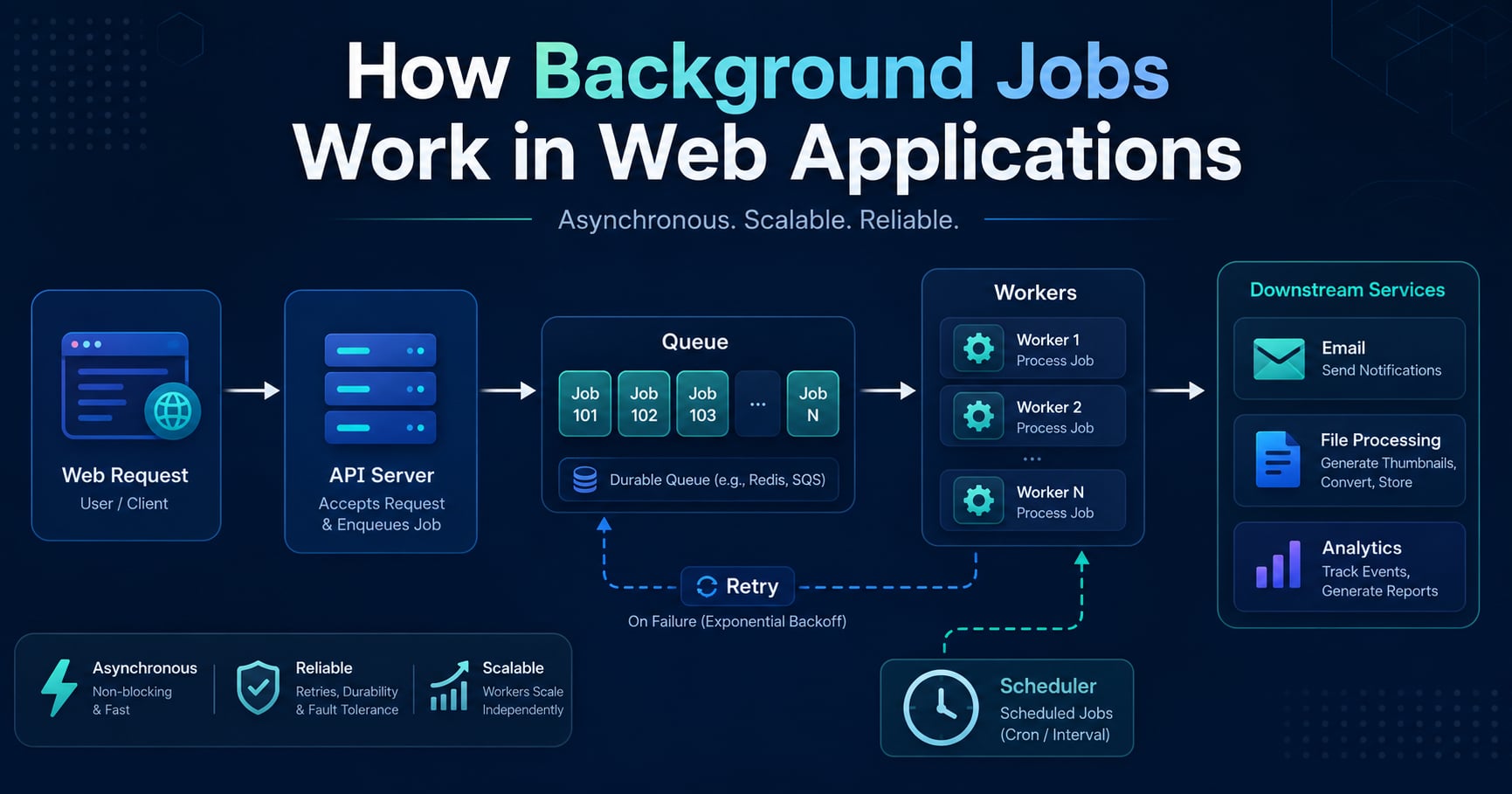
A user clicks “Place Order” and expects a fast success response. But your backend may still need to send a receipt email, update analytics, notify the warehouse, resize an uploaded image, and call a third-party fraud service. If every one of those steps stays inside the request path, one slow dependency can make the entire application feel unreliable.
That is why backend systems use background jobs. They move work that does not need to finish immediately out of the user-facing request path and into asynchronous workers that can process tasks safely later.
This guide explains how background jobs work in web applications, what pieces are involved, and how production teams design queues, workers, schedulers, retries, and monitoring around them. If you are following the learning path, read What Is a Message Queue? Simple Explanation with Examples, How Logging Works in Backend Systems, and What Is Application Performance Monitoring (APM)? Beginner Guide first. For the broader roadmap, use the Practical Backend Engineering series as the pillar page and the Backend Development tag as the category page.
Table of Contents
Open Table of Contents
- What Are Background Jobs?
- Why Web Applications Need Background Jobs
- Request Path vs Background Processing
- Core Components of a Background Job System
- How Background Jobs Work Step by Step
- A Practical Example: Processing an Order After Checkout
- Scheduling, Delays, and Cron-Like Work
- Retries, Idempotency, and Dead-Letter Queues
- Observability and Operations
- Common Use Cases
- Common Mistakes
- Real-World Examples
- Interview Questions
- 1. What is a background job in a web application?
- 2. How do background jobs differ from message queues?
- 3. Why should workers be idempotent?
- 4. What work should stay synchronous instead of becoming a background job?
- 5. What metrics matter for background-job systems?
- 6. What is the difference between a cron job and a background job?
- Conclusion
- References
- YouTube Videos
What Are Background Jobs?
A background job is a unit of work that your application accepts now but processes outside the immediate HTTP request-response cycle.
Instead of making the user wait for every side effect to complete, the application does the minimum required synchronous work first, then hands off follow-up work to a worker process. That worker runs separately from the web server and can process the task seconds or minutes later.
Examples of background jobs include:
- sending order confirmation emails
- generating PDF invoices
- resizing uploaded images
- importing CSV files
- retrying failed webhooks
- cleaning up expired sessions
The important distinction is not whether the work happens “later.” The important distinction is whether the user must wait for it before receiving a response. If the answer is no, it is a strong candidate for background processing.
Why Web Applications Need Background Jobs
Background jobs solve a very practical problem: too much work in the request path makes applications slow and fragile.
Suppose your checkout endpoint performs all of these tasks inline:
- validate the cart
- charge the payment
- save the order
- send the email
- update inventory
- publish analytics
- notify the warehouse
Only some of that work is truly user-blocking. The user needs to know whether payment and order creation succeeded. The user does not need to wait for the email provider, analytics platform, or warehouse integration.
By moving non-critical follow-up work into background jobs, you get several benefits:
- Lower latency: the request returns faster because it does less synchronous work.
- Better reliability: if a downstream service is temporarily slow or unavailable, the main request can still succeed.
- Traffic smoothing: queues absorb bursts so workers can drain tasks at a controlled rate.
- Independent scaling: you can scale web servers and workers separately.
This is closely related to the request-decoupling ideas in What Is a Message Queue? Simple Explanation with Examples. A queue does not just store messages. It creates a boundary between accepting work and completing work.
Request Path vs Background Processing
The easiest way to understand background jobs is to compare the two models directly.
Synchronous request flow
flowchart TD
    A[User Request] --> B[Web Server]
    B --> C[(Database)]
    B --> D[Email Provider]
    B --> E[Image Processor]
    B --> F[Analytics API]
    F --> G[HTTP Response]
    E --> G
    D --> G
    C --> G
In this design, the response depends on every downstream step finishing in time. If the email provider has a 6-second timeout, your user might wait 6 seconds even though the order itself was already saved.
Background job flow
flowchart TD
    A[User Request] --> B[Web Server]
    B --> C[(Database)]
    B --> D[Job Queue]
    D --> E[Worker]
    E --> F[Email Provider]
    E --> G[Image Processor]
    E --> H[Analytics API]
    C --> I[Fast HTTP Response]
    D --> I
Now the request path is shorter:
- validate input
- save the required data
- enqueue one or more jobs
- return the response
The background worker handles the rest. This is usually the better design when the follow-up work is important but not immediately required by the user.
Core Components of a Background Job System
A production background-job system usually contains five pieces.
1. Producer
The producer is the application code that creates the job. In many systems, the producer lives inside the web application.
For example:
- the checkout API enqueues
send-order-email - the upload API enqueues
generate-thumbnail - the billing service enqueues
retry-failed-webhook
The producer should create a job only after the main business record is safely persisted. If you enqueue first and the database write fails later, you can end up with a worker trying to process an order that does not actually exist.
2. Queue
The queue stores pending work until a worker is ready to process it.
This queue may be implemented with:
- Redis-backed job systems such as Sidekiq or BullMQ
- managed queues such as Amazon SQS
- message brokers such as RabbitMQ
- database-backed job tables in simpler systems
The queue is useful because it buffers spikes. If 20,000 uploads arrive in ten minutes, you do not need 20,000 workers instantly. The queue holds the backlog while workers drain it.
3. Worker
A worker is a separate process that pulls jobs from the queue and executes them.
Workers often:
- run on different machines than the web app
- scale horizontally based on queue depth
- have concurrency limits
- retry failures with backoff
This separation matters. Your web server should stay optimized for short request handling. Your worker can be optimized for heavier, slower, and more failure-prone tasks.
4. Scheduler
Some jobs do not start immediately. A scheduler handles:
- delayed jobs such as “send reminder in 24 hours”
- recurring jobs such as “rebuild daily report at 1 AM”
- maintenance jobs such as “delete expired sessions every hour”
This is where cron-like behavior enters the picture, but cron is only one way to trigger scheduled work. Many application frameworks also support delayed jobs and internal schedulers.
5. Monitoring and Retry Logic
A background system without observability is not production-ready. You need visibility into:
- queue depth
- oldest job age
- worker error rate
- retry count
- dead-letter queue volume
That is the operational side of the topic already hinted at in What Is Application Performance Monitoring (APM)? Beginner Guide. Teams often instrument HTTP requests well and forget workers, which leaves a blind spot exactly where asynchronous failures hide.
How Background Jobs Work Step by Step
Here is a typical lifecycle.
flowchart TD
    A[HTTP Request Arrives] --> B[Validate Input]
    B --> C[Write Required Data]
    C --> D[Enqueue Job]
    D --> E[Return HTTP Response]
    D --> F[Worker Pulls Job]
    F --> G{Job Succeeds?}
    G -- Yes --> H[Ack and Remove]
    G -- No --> I{Retryable?}
    I -- Yes --> J[Requeue with Delay]
    I -- No --> K[Move to DLQ]
Let us walk through the flow:
- The user sends a request, such as uploading a file.
- The application validates the request.
- The application performs the minimum synchronous work, such as saving the file metadata and object-storage path.
- The application enqueues a job like
process-upload. - The HTTP response returns immediately.
- A worker pulls the job from the queue.
- The worker performs the expensive work, such as virus scanning, thumbnail generation, and metadata extraction.
- If processing succeeds, the worker acknowledges the job and it disappears from the queue.
- If processing fails temporarily, the system retries later.
- If processing fails repeatedly, the job moves to a dead-letter queue for inspection.
That is the core pattern behind most web-app background processing systems, whether the stack uses Ruby, Python, Node.js, Java, or Go.
A Practical Example: Processing an Order After Checkout
Consider an ecommerce checkout endpoint. The user needs an answer quickly, but several side effects should still happen.
What belongs in the request path?
- validate inventory and pricing
- authorize or capture payment
- write the order to the database
What belongs in background jobs?
- send receipt email
- notify warehouse
- update recommendation features
- write analytics events to downstream systems
- generate invoice PDF
Producer example
async function placeOrder(req, res) {
  const order = await saveOrder(req.body);

  await jobQueue.add("send-order-confirmation", {
    orderId: order.id,
    userId: order.userId,
  });

  await jobQueue.add("sync-order-side-effects", {
    orderId: order.id,
  });

  res.status(201).json({
    orderId: order.id,
    status: "confirmed",
  });
}
This code does two important things:
- It saves the order before enqueuing follow-up work.
- It returns the response without waiting for email delivery or third-party integrations.
Worker example
jobQueue.process("send-order-confirmation", async job => {
  const order = await loadOrder(job.data.orderId);

  if (!order) {
    throw new Error("Order not found");
  }

  // Use the database record as the source of truth rather than trusting stale payload data.
  await sendOrderEmail(order.userId, order.id);

  // Record success so operations can audit delivery later.
  await markJobResult(job.id, "sent");
});
The worker loads the order from storage instead of trusting only the payload. That reduces coupling and avoids processing old or incomplete job data after later business-rule changes.
Scheduling, Delays, and Cron-Like Work
Not every background job starts right away.
Some jobs are delayed on purpose:
- send an abandoned-cart reminder in 2 hours
- retry a failed webhook in 5 minutes
- wait 24 hours before generating a digest email
Other jobs are recurring:
- create a nightly report
- clean expired tokens every hour
- refresh search indexes every day
Here is the practical distinction:
- Immediate jobs start as soon as a worker is available.
- Delayed jobs are queued now but become eligible later.
- Recurring jobs are created on a schedule.
This is where developers often say “cron job,” but that phrase is narrower than the full topic. A cron job is one scheduling mechanism for recurring tasks. Background jobs are the larger architecture pattern that includes immediate, delayed, and recurring work.
For example:
- A Linux cron entry may run
cleanup-expired-sessionsevery hour. - A queue system may schedule
retry-webhook10 minutes from now. - An application scheduler may create
send-daily-digestjobs at midnight for each user.
The next post in the series can go deeper into cron specifically, but the main lesson here is that scheduling decides when a job becomes runnable, while workers decide how the job gets processed.
Retries, Idempotency, and Dead-Letter Queues
This is the part beginners usually underestimate.
Background jobs fail for normal reasons:
- email provider timeouts
- temporary database issues
- rate-limited third-party APIs
- worker crashes
- malformed job payloads
Retries
Retries are appropriate for temporary failures, but they must be controlled. If an email provider is down, retrying 10,000 jobs instantly can make the outage worse.
The usual pattern is exponential backoff:
- first retry after 30 seconds
- second retry after 2 minutes
- third retry after 10 minutes
- stop after a fixed limit
Idempotency
Most real systems behave closer to at-least-once delivery than “exactly once.” That means a worker may process the same job more than once after crashes or acknowledgment races.
Your worker logic must therefore be idempotent. Running it twice should not create duplicate business effects.
Examples:
- sending the same invoice twice is bad
- charging the same customer twice is catastrophic
- writing the same “email sent” state twice is usually harmless
Idempotency is often implemented with:
- unique business keys
- deduplication tables
- status checks before side effects
- provider-side idempotency keys
Dead-letter queue
A dead-letter queue (DLQ) stores jobs that failed too many times or failed in a non-retryable way.
This matters because “retry forever” is not resilience. It is hidden backlog growth. A poisoned job should be isolated so engineers can inspect the payload, understand the failure, and decide whether to replay or discard it.
Observability and Operations
Background jobs are easy to add and easy to forget. That is why teams need operational discipline around them.
The most useful metrics are:
- queue depth: how many jobs are waiting
- oldest job age: how long the oldest pending job has been waiting
- worker throughput: how many jobs finish per minute
- retry rate: how often jobs need another attempt
- failure rate: how often jobs exhaust retries
- DLQ count: how many jobs require manual investigation
You also want structured logs that include:
- job name
- job ID
- business record ID such as
orderId - retry number
- processing duration
- final status
This is why How Logging Works in Backend Systems matters for asynchronous systems too. A request ID may create the original order, but background workers often need their own correlation fields so engineers can trace work across delayed pipelines.
Common Use Cases
Background jobs show up in almost every serious web application.
Email and notifications
Password reset emails, order confirmations, push notifications, and SMS delivery should usually run asynchronously so a slow provider does not block the user request.
File processing
Uploading the original file can stay in the request path, but virus scanning, thumbnail generation, OCR, transcoding, and metadata extraction are classic background tasks.
Data imports and exports
Large CSV imports and data exports are often too slow for one request. A job system lets the user start the work, leave the page, and get notified later.
Webhook delivery
When your application sends webhooks to external customers, retries and delayed delivery are essential because customer endpoints fail unpredictably.
Scheduled maintenance
Recurring cleanup, reporting, compaction, cache warming, and reminder systems are all natural background workloads.
Common Mistakes
1. Pushing critical user-facing decisions into background jobs
If the user must know the answer before proceeding, do not hide it behind asynchronous work. Authentication, authorization, and payment success usually belong in the request path.
2. Enqueuing before committing the main data
If a worker starts before the main database transaction is committed, it may load missing or inconsistent data. Persist first, then enqueue.
3. Assuming jobs run exactly once
They often do not. If duplicate processing would break the business, idempotency is mandatory.
4. Retrying everything forever
Some failures are permanent. Bad payloads, deleted records, or invalid email addresses should usually stop retrying and go to a DLQ or terminal-failure state.
5. Forgetting worker monitoring
A healthy web API can hide a broken worker fleet for hours if queue age and retries are not being monitored.
6. Running one giant job instead of smaller safe jobs
Large jobs are harder to retry, slower to recover, and more painful to debug. Small task-oriented jobs usually fail more gracefully and scale better.
Real-World Examples
Ecommerce order flows
Stores commonly keep payment authorization and order creation synchronous, then hand off receipts, fraud review, loyalty updates, and warehouse notifications to background workers. That keeps checkout fast even when secondary systems slow down.
Media upload pipelines
Photo and video products typically accept the upload first, then process thumbnails, transcoding, moderation, and indexing asynchronously. This prevents one large upload from tying up the request path for too long.
Webhook platforms
APIs that send webhooks to thousands of customers need queues, workers, retries, and DLQs because customer endpoints fail at different times and at different rates. Background jobs make those failures manageable instead of user-facing.
Interview Questions
1. What is a background job in a web application?
A background job is a unit of work that the application accepts now but processes outside the immediate request-response cycle. The main reason to use one is to remove slow or failure-prone follow-up work from the critical path seen by the user. In practice, this keeps APIs responsive while still allowing important side effects such as emails, webhooks, or file processing to happen reliably. The trade-off is extra operational complexity around retries, ordering, idempotency, and monitoring.
2. How do background jobs differ from message queues?
A message queue is usually one component inside a background-job system rather than a complete replacement for the concept. The queue stores work until workers can process it, while the broader background-job system also includes producers, workers, retries, scheduling, observability, and business-specific job logic. I usually explain it this way: the queue is the transport and buffering mechanism, while background jobs are the application pattern built on top of it. You can discuss queues without background jobs, but many web apps use queues specifically to implement background processing.
3. Why should workers be idempotent?
Workers should be idempotent because most queue-based systems are designed closer to at-least-once delivery than exactly-once execution. A worker may crash after performing the business action but before acknowledging the job, which can cause the same job to be retried later. If the logic is not idempotent, the system may send duplicate emails, duplicate invoices, or duplicate charges. Idempotency gives you the reliability benefits of retries without corrupting business state.
4. What work should stay synchronous instead of becoming a background job?
Work should stay synchronous when the caller truly needs the answer before continuing, or when delaying it would create confusing or unsafe behavior. Authentication, authorization, validation results, payment success, and inventory reservation are common examples because the user should not be told “success” before those checks are known. I usually frame the decision around user expectations and business correctness: if the result must shape the current response, keep it in the request path. If it is a follow-up side effect, background processing is often the better fit.
5. What metrics matter for background-job systems?
The most important metrics are queue depth, oldest job age, worker throughput, retry rate, failure rate, and DLQ count. Queue depth alone is not enough because a deep queue can still be healthy if workers are draining it fast enough. Oldest job age is often the sharper signal because it shows how long real work is being delayed. I also want structured logs and traces tied to job IDs and business record IDs so failures can be diagnosed quickly.
6. What is the difference between a cron job and a background job?
A cron job is a scheduling mechanism for recurring tasks, while a background job is the broader pattern of processing work outside the request path. Cron answers “when should this task be triggered?” but background workers answer “how is this task executed safely, retried, observed, and scaled?” Some recurring tasks are implemented as cron jobs that enqueue background jobs rather than doing the full work directly inside the cron-triggered process. That separation usually improves reliability because the scheduler stays simple and the worker system handles retries and scaling.
Conclusion
- Background jobs move slow, non-user-blocking work out of the request path so web applications stay responsive.
- A complete background-job system usually includes producers, queues, workers, schedulers, retries, and monitoring.
- Reliability depends on good retry policy, idempotent workers, and a dead-letter queue for poisoned jobs.
- Queue depth alone is not enough; teams also need to monitor oldest-job age, failure rate, and retry volume.
- Background jobs are ideal for emails, uploads, imports, webhooks, and recurring maintenance tasks.
The next topic in this series covers What Is a Cron Job? Complete Beginner Guide and goes deeper into recurring scheduled tasks and how they differ from general asynchronous job processing.
For the closest companion post, read What Is a Message Queue? Simple Explanation with Examples next, then revisit the Practical Backend Engineering series for the rest of the roadmap.
References
-
Background Jobs - Sidekiq Wiki
https://github.com/sidekiq/sidekiq/wiki -
BullMQ Documentation
https://docs.bullmq.io/ -
Inngest Documentation - Background Functions
https://www.inngest.com/docs/features/inngest-functions
YouTube Videos
-
“Next.js Background Jobs / Cron Jobs / Queue / AI-Calls Are EASY Now! (Inngest)“
https://www.youtube.com/watch?v=6nIX41-9rhA -
“FastAPI Tutorial #12: Background Jobs From Base to Advanced”
https://www.youtube.com/watch?v=V9z13NUJDhs -
“Building a Scalable Queue System with NestJS & BullMQ & Redis”
https://www.youtube.com/watch?v=ZaPbP9DwBOE